Hi, |
Re: Run Comparison Wizard using DXL I tried with the below dxl but this is running as independent dxl. Since I want to perform some actions on clicking finish of comparison wizard, this will not be fine. eval_("#include <C://Program Files//Telelogic//DOORS_8.3//lib//dxl//standard//compwizard//compwiz.dxl>" Moroever I want to edit some configurations in the comparison wizard like uncheck the checkbox of filter etc. Is there any way I can configure this prior to running the wizard |
Re: Run Comparison Wizard using DXL DXLScripter - Wed Sep 05 05:34:38 EDT 2012
See here:
eval_("
DB myDialog = null

// we replace show by realize, this way the execution will continue after the include
void showOld (DB x) { show x }
void show (DB x) { myDialog = x; realize x } // make show use realize only
#include <C://Program Files//Telelogic//DOORS_8.3//lib//dxl//standard//compwizard//compwiz.dxl>

// Now after the include the dialog is realized, we can change our settings
set (<DBE option>, <Value>

// Now show it...
showOld myDialog // show the dialog now...
")
Mathias Mamsch, IT-QBase GmbH, Consultant for Requirement Engineering and D00RS
|
Re: Run Comparison Wizard using DXL Mathias Mamsch - Wed Sep 05 06:39:42 EDT 2012
See here:
eval_("
DB myDialog = null

// we replace show by realize, this way the execution will continue after the include
void showOld (DB x) { show x }
void show (DB x) { myDialog = x; realize x } // make show use realize only
#include <C://Program Files//Telelogic//DOORS_8.3//lib//dxl//standard//compwizard//compwiz.dxl>

// Now after the include the dialog is realized, we can change our settings
set (<DBE option>, <Value>

// Now show it...
showOld myDialog // show the dialog now...
")
Mathias Mamsch, IT-QBase GmbH, Consultant for Requirement Engineering and D00RS
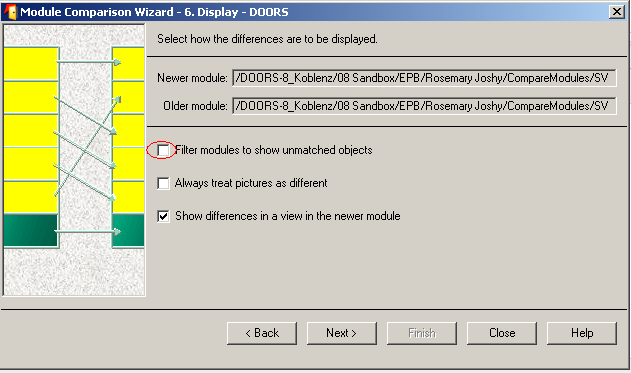
Requirement is that I have to run the comparison wizard with 'Filter modules to show unmatched objects' checkbox unchecked. Also once user press Finish button of the wizard it should excecute another dxl say myDxl.dxl. This myDxl.dxl script also requires info about the Older module which the newer module is compared with. Attachments attachment_14883028_CompareModule_Config.bmp |
Re: Run Comparison Wizard using DXL DXLScripter - Wed Sep 05 07:40:18 EDT 2012 Mathias Mamsch, IT-QBase GmbH, Consultant for Requirement Engineering and D00RS |
Re: Run Comparison Wizard using DXL Mathias Mamsch - Wed Sep 05 18:21:55 EDT 2012 Mathias Mamsch, IT-QBase GmbH, Consultant for Requirement Engineering and D00RS When I run myDxl.dxl script this should invoke the comparison wizard DXL not as an independent script but in the context of myDxl.dxl script and return back to the dxl code after the eval_ comparison wizard call. I tried the below code but this is making all other DOORS pgm insensitive cos of block keyword. print "Running comp wiz dxl from myDxl" eval_(" DB myDialog = null void blockDlg (DB x) { block x } void releaseDlg (DB x) { release x} void show (DB x) { myDialog = x; show x } #include <C://Program Files//Telelogic//DOORS_8.3//lib//dxl//standard//compwizard//compwiz.dxl> //set (<DBE option>, <Value> blockDlg myDialog releaseDlg myDialog ") print "Finished running comp wiz dxl. Back to myDxl" For setting the DBE this is not possible as all the compwiz dxl scripts are encrypted except usercallouts.dxl and wizard.inc |
Re: Run Comparison Wizard using DXL DXLScripter - Thu Sep 06 03:39:29 EDT 2012 For setting the DBE this is not possible as all the compwiz dxl scripts are encrypted except usercallouts.dxl and wizard.inc
Well I thought from reading the two posts, you could figure out, how to do this, but I guess its a little complicated. The DXL comparison wizard is using 'show' to show the dialog and 'hide' to hide the dialog. We can now defer the show, by overriding show with realize. This will make the comparison wizard run over the show and continue with our eval script.
void showOld (DB x) { show x }
void show (DB x) { realize x } // make show use realize only
void hideOld (DB x) { hide x }
void hide (DB x) { release x; hide x}
DBE el1, el2

void makeGUI () {
   DB diag = ...
   el1 = ...
   show diag
}
DB myDialog = null;
void showOld (DB x) { show x }
void show (DB x) { myDialog = x; realize x } // make show use realize only, save the handle
eval_("
DB myDialog = null;
void showOld (DB x) { show x }
void show (DB x) { myDialog = x; realize x } // make show use realize only, save the handle

void hideOld (DB x) { hide x }
void hide (DB x) { release x; hide x}

// note that lib/dxl is a standard addin path and you do not need double forward slashes
#include <standard/compwizard/compwiz.dxl>


// Now after the include the dialog is realized, we can change our settings
set (filterOpt, false)

// Now show it...
block myDialog // show the dialog now...

// You can read stuff from the dialog here. It might be necessary to not hide the
// dialog, so you would only call release in the hide(...) function.

destroy myDialog

ack \"Finished, doing more stuff!\"
")
deleteFile "C:/temp/trace.txt"
startDXLTracing_ "C:/temp/trace.txt"
#include <standard/compwizard/compwiz.dxl>
stopDXLTracing_
DBE toggle (DB x, string s, bool v) {
   int d1,d2
   // lets look for a toggle that contains the word 'filter'
   if (findPlainText(s, "filter", d1, d2, false)) { return addr_ 1337 }
}

deleteFile "C:/temp/trace.txt"
startDXLTracing_ "C:/temp/trace.txt"
#include <standard/compwizard/compwiz.dxl>
Mathias Mamsch, IT-QBase GmbH, Consultant for Requirement Engineering and D00RS
|
Re: Run Comparison Wizard using DXL Mathias Mamsch - Thu Sep 06 04:36:53 EDT 2012
Well I thought from reading the two posts, you could figure out, how to do this, but I guess its a little complicated. The DXL comparison wizard is using 'show' to show the dialog and 'hide' to hide the dialog. We can now defer the show, by overriding show with realize. This will make the comparison wizard run over the show and continue with our eval script.
void showOld (DB x) { show x }
void show (DB x) { realize x } // make show use realize only
void hideOld (DB x) { hide x }
void hide (DB x) { release x; hide x}
DBE el1, el2

void makeGUI () {
   DB diag = ...
   el1 = ...
   show diag
}
DB myDialog = null;
void showOld (DB x) { show x }
void show (DB x) { myDialog = x; realize x } // make show use realize only, save the handle
eval_("
DB myDialog = null;
void showOld (DB x) { show x }
void show (DB x) { myDialog = x; realize x } // make show use realize only, save the handle

void hideOld (DB x) { hide x }
void hide (DB x) { release x; hide x}

// note that lib/dxl is a standard addin path and you do not need double forward slashes
#include <standard/compwizard/compwiz.dxl>


// Now after the include the dialog is realized, we can change our settings
set (filterOpt, false)

// Now show it...
block myDialog // show the dialog now...

// You can read stuff from the dialog here. It might be necessary to not hide the
// dialog, so you would only call release in the hide(...) function.

destroy myDialog

ack \"Finished, doing more stuff!\"
")
deleteFile "C:/temp/trace.txt"
startDXLTracing_ "C:/temp/trace.txt"
#include <standard/compwizard/compwiz.dxl>
stopDXLTracing_
DBE toggle (DB x, string s, bool v) {
   int d1,d2
   // lets look for a toggle that contains the word 'filter'
   if (findPlainText(s, "filter", d1, d2, false)) { return addr_ 1337 }
}

deleteFile "C:/temp/trace.txt"
startDXLTracing_ "C:/temp/trace.txt"
#include <standard/compwizard/compwiz.dxl>
Mathias Mamsch, IT-QBase GmbH, Consultant for Requirement Engineering and D00RS
By the way, there is a typo:
...
void hideOld (DB x) { hide x }
void hide (DB x) { release x; hideOld x} // not hide!
...
Mathias Mamsch, IT-QBase GmbH, Consultant for Requirement Engineering and D00RS
|
Re: Run Comparison Wizard using DXL Mathias Mamsch - Mon Sep 10 05:34:12 EDT 2012
By the way, there is a typo:
...
void hideOld (DB x) { hide x }
void hide (DB x) { release x; hideOld x} // not hide!
...
Mathias Mamsch, IT-QBase GmbH, Consultant for Requirement Engineering and D00RS
############################################################################## eval_(" DB myDialog = null // we replace show by realize, this way the execution will continue after the include void blockDlg (DB x) { block x } void hideOld (DB x) { hide x } void hide (DB x) { release x; hideOld x} void showOld (DB x) { show x } void show (DB x) { myDialog = x; realize x } // make show use realize only #include <C://Program Files//Telelogic//DOORS_8.3//lib//dxl//standard//compwizard//compwiz.dxl> // Now after the include the dialog is realized, we can change our settings //set (<DBE option>, <Value> // Now show it... blockDlg myDialog // show the dialog now... showOld myDialog ") print "Comp wizard finished running" ############################################################################## |
Re: Run Comparison Wizard using DXL DXLScripter - Fri Sep 21 05:40:34 EDT 2012 In my dxl script I want to invoke the ComparisonWizard. Compwizard has 6 Dialogbox, I want all 6 DB to be excecuted and on clicking Finish I should continue with my dxl script. eval_(" DB myDialog = null // we replace show by realize, this way the execution will continue after the include void blockDlg (DB x) { block x } void hideOld (DB x) { hide x } void hide (DB x) { release x; hideOld x} void showOld (DB x) { show x } void show (DB x) { myDialog = x; realize x } // make show use realize only #include <C://Program Files//Telelogic//DOORS_8.3//lib//dxl//standard//compwizard//compwiz.dxl> // Now after the include the dialog is realized, we can change our settings //set (<DBE option>, <Value> // Now show it... blockDlg myDialog // show the dialog now... showOld myDialog ") if(showing(....."DialogBox 6 handle")) { print "Comp wizard finished running" } |
Re: Run Comparison Wizard using DXL DXLScripter - Mon Sep 24 05:43:11 EDT 2012
You are right. I did not test clicking on the next button. The problem is, that the stupid comparison wizard does hide dialog ... show dialog ...
Module modCur = current

if (null modCur) {
   error "You need to have a current Module!"
   halt
}

eval_("
DB myDialog = null;

bool bDialogShown = false

// we track showing the dialog with realize and show now. bDialogShown will then be true.
void realizeOld (DB x) { realize x }
void realize (DB x) {
   bDialogShown = true
   realizeOld x
}

void showOld (DB x) { show x }
void show (DB x) { myDialog = x; realize x } // make show use realize only, save the handle

void hideOld (DB x) { hide x }
void hide (DB x) { release x; bDialogShown = false; hideOld x}

// note that lib/dxl is a standard addin path and you do not need double forward slashes
#include <standard/compwizard/compwiz.dxl>


// Now after the include the dialog is realized, we can change our settings
set (filterOpt, false)

// Now block it as long as it is visible.
while (true) {
  block myDialog // show the dialog now...
  // if the dialog does hide/show or hide/realize now, then
  // bDialogShown will be true, otherwise it will be false
  // if the dialog has been hidden
  if (!bDialogShown)  break
}

// You can read stuff from the dialog here. It might be necessary to not hide the
// dialog, so you would only call release in the hide(...) function.

destroy myDialog
")

ack "Finished Dialog!"
Mathias Mamsch, IT-QBase GmbH, Consultant for Requirement Engineering and D00RS
|
Re: Run Comparison Wizard using DXL Mathias Mamsch - Wed Sep 26 15:34:19 EDT 2012
You are right. I did not test clicking on the next button. The problem is, that the stupid comparison wizard does hide dialog ... show dialog ...
Module modCur = current

if (null modCur) {
   error "You need to have a current Module!"
   halt
}

eval_("
DB myDialog = null;

bool bDialogShown = false

// we track showing the dialog with realize and show now. bDialogShown will then be true.
void realizeOld (DB x) { realize x }
void realize (DB x) {
   bDialogShown = true
   realizeOld x
}

void showOld (DB x) { show x }
void show (DB x) { myDialog = x; realize x } // make show use realize only, save the handle

void hideOld (DB x) { hide x }
void hide (DB x) { release x; bDialogShown = false; hideOld x}

// note that lib/dxl is a standard addin path and you do not need double forward slashes
#include <standard/compwizard/compwiz.dxl>


// Now after the include the dialog is realized, we can change our settings
set (filterOpt, false)

// Now block it as long as it is visible.
while (true) {
  block myDialog // show the dialog now...
  // if the dialog does hide/show or hide/realize now, then
  // bDialogShown will be true, otherwise it will be false
  // if the dialog has been hidden
  if (!bDialogShown)  break
}

// You can read stuff from the dialog here. It might be necessary to not hide the
// dialog, so you would only call release in the hide(...) function.

destroy myDialog
")

ack "Finished Dialog!"
Mathias Mamsch, IT-QBase GmbH, Consultant for Requirement Engineering and D00RS
1. string comparedMod not identified inside eval_ function 2. Not able to set field 'oldModList' I tried to get the oldModList value and this returns the compared module; which states I am referring to the correct DBE. Module modCur = current string comparedMod = "\\DOORS-8\\CompareModules\\CompMod" if (null modCur) { error "You need to have a current Module!" halt } eval_(" DB myDialog = null; bool bDialogShown = false void realizeOld (DB x) { realize x } void realize (DB x) { bDialogShown = true realizeOld x } void showOld (DB x) { show x } void show (DB x) { myDialog = x; realize x } void hideOld (DB x) { hide x } void hide (DB x) { release x; bDialogShown = false} #include <standard/compwizard/compwiz.dxl> set (filterOpt, false) set (oldModList, comparedMod) while (true) { block myDialog if (!bDialogShown) break } string comparedModName = get oldModList print comparedModName destroy myDialog ") ack "Finished Dialog!" |
Re: Run Comparison Wizard using DXL DXLScripter - Fri Sep 28 05:48:04 EDT 2012
To set the older module name you need to use: olderModName = \"abc\"
...
eval_ "
...
// marshal compareMod to eval context ...
string comparedModInsideEval = addr_ " ((addr_ comparedMod) int) "
...
"
string escapeCompareMod = escapeString (compareMod)

eval_ "
...
string compareMod = \"" escapeCompareMod "\"
...
"
Mathias Mamsch, IT-QBase GmbH, Consultant for Requirement Engineering and D00RS
|